Screenshot it and forget it.
It comes back when you need it.
Every shot you take gets filed by why you took it — the offhand ones sink out of the way, the important ones are a second away, the keepers gather on their own. On-device OCR, full-text search, and your images never leave the device.
Other tools either store your shots or help you search them — none of them reads why you took it first, then decides where it belongs. Fully on-device, fully searchable, sorted on its own — there's nothing else quite like it.
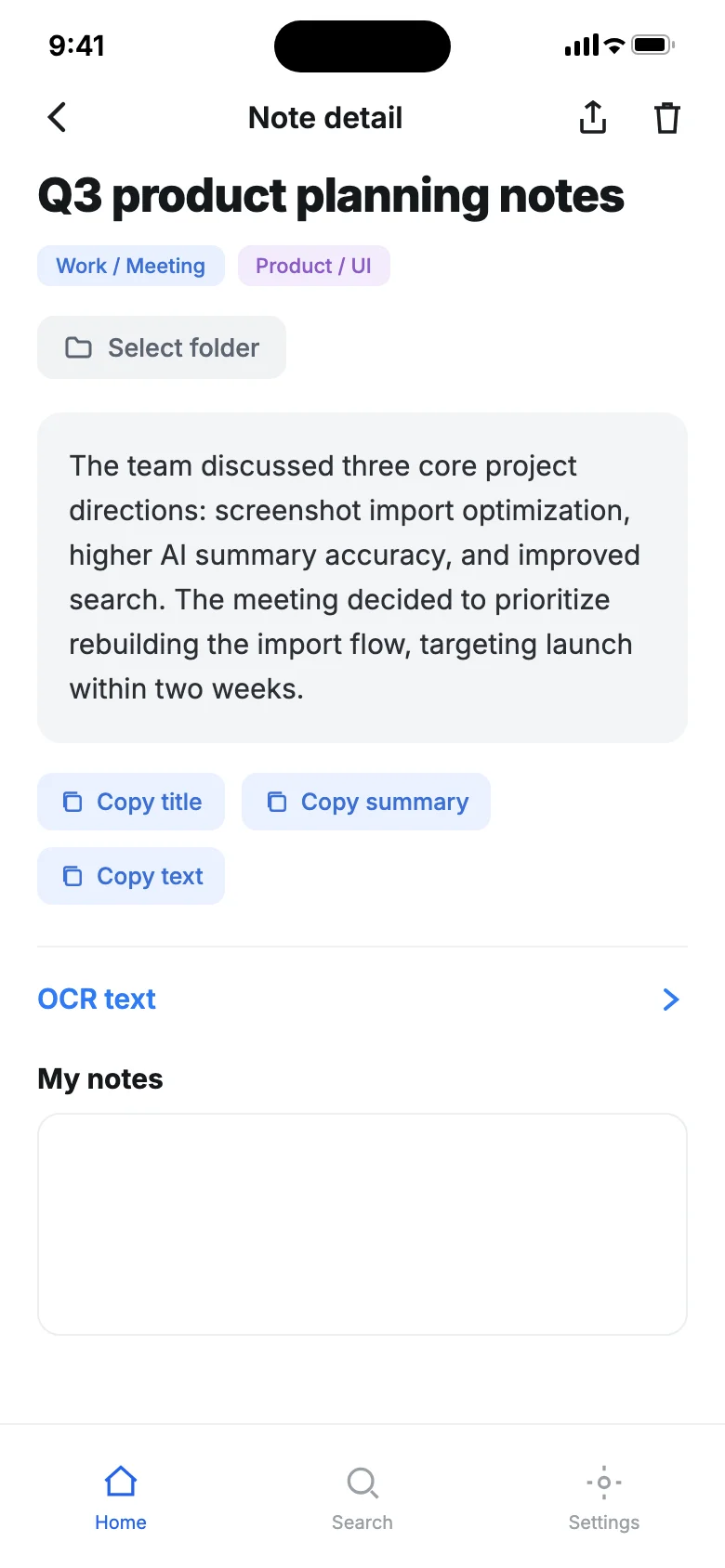
It reads every shot before you do
- ✓AI writes a title, summary, and key takeaways — tap any to copy — so you know what it is at a glance
- ✓The OCR text and your own notes are kept and copyable
- ✓Key fields are pulled out — no digging through the original
What it quietly does for you
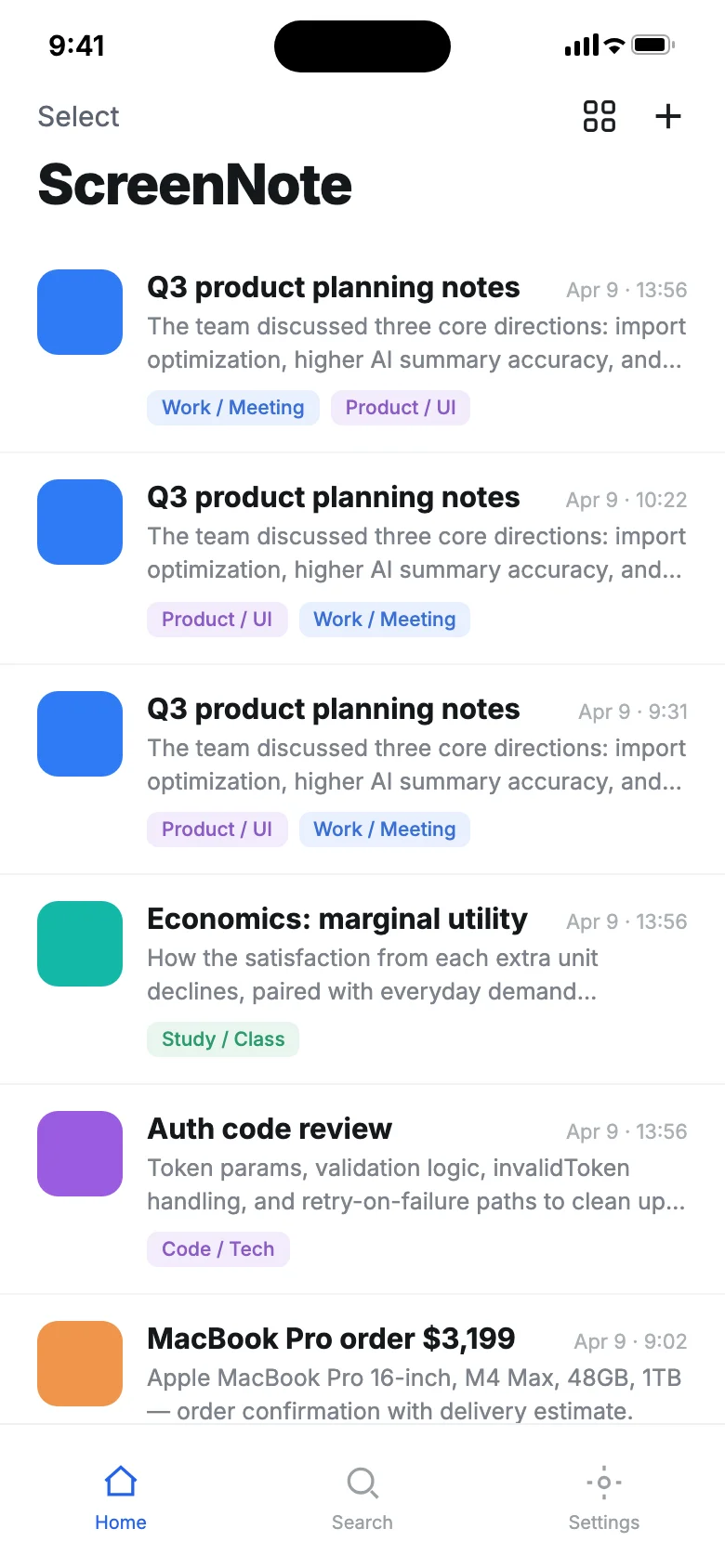
Auto-sorted by why you took it
A screenshot is a screenshot, but the reasons behind them aren't. The quick-share ones fold away to cut the noise, important receipts float to the top, and the keepers gather by theme — no more one big heap you can never dig through.
On-device OCR · images stay put
Apple Vision reads the text — in English and Chinese — right on your device, bringing the words inside a screenshot back to life as searchable, copyable content. It all happens on your phone; nothing is ever sent to a server.
One word brings the shot back
You search what's actually inside the image — the OCR text, title, summary, tags, your own notes — not some filename you'd never remember. With Spotlight, you can land on any shot straight from system search.
Related shots surface on their own
Open one shot, and others on the same topic or from the same source appear right beside it. Find one, and you often pull back a whole string — a goldmine when you're writing or thinking.
Optional AI · bring your own key
When you want it even more hands-off, let AI write titles and summaries, or pull the order number, amount, and due date out of a receipt. Just plug in a third-party API key — 17 providers supported — and it's all fully usable without one too.
Weekly recap / year in review / quote cards
Your week in review, the year's best, and standout quotes export with one tap into polished 1080×1350 cards (Minimal / Dark / Gradient), ready to share straight to social.
Take the shot — that's all you do
Get them in, effortlessly
Bulk-import from your photo library, share from any app, auto-capture via a Shortcut, or just have it spot new screenshots when you reopen the app.
It reads them, on-device
Apple Vision runs OCR on-device to bring the text back; add AI and it'll write titles, summaries, and key takeaways, and pull out key fields too. All of it stays local.
It files them by reason
Offhand ones fold into "Quick" and stay out of the way; receipts float to the Important shelf with copyable fields extracted; keepers gather by theme — a clean home screen at a glance.
They come back when you need them
Remember a single word, search the OCR text, and the shot's right there; open it and related ones surface alongside. Across devices, it syncs through your own iCloud.
When it earns its keep
Receipts, found in a second
Order numbers, WiFi passwords, verification codes, IDs, addresses — you screenshot them and forget them. The day you need one, search a keyword and it's there in an instant, key details one tap to copy, nothing private ever touching the cloud.
A writer's swipe file
A sharp take, a great tutorial, a line worth keeping — copying it is a hassle, so you screenshot instead. OCR brings the words back, same-topic shots gather on their own, and when you write you pull whole handfuls — quote cards included.
A clean home screen for heavy screenshotters
If you take 5–10 shots a day and never look back, opening the app is no longer a wall of clutter: the offhand ones sink, the important ones rise, and a year-in-review even shows you everything you saw this year.
You might be wondering
Can I use it without AI?
Absolutely. OCR, full-text search, smart sorting, export, iCloud sync — all the core features run 100% on-device and rely on no AI at all. AI is a purely optional extra.
Will my screenshots be uploaded?
No. OCR runs entirely on your device, your images never leave it, and there's no account to sign up for and no data upload. Cross-device sync goes through your own private iCloud library — even the developer can't see it.
How is AI priced? Is there a subscription?
The app itself is free, no subscription. AI is bring-your-own-key (BYOK): you plug in your own third-party API key, and you're billed by that provider directly. Works with OpenAI, Anthropic, DeepSeek, Kimi, Zhipu, Qwen, and 17 providers in all.
What's different between the Mac and iPhone versions?
One dataset, synced across all three platforms via iCloud. To stay true to local-first, the Mac version ships with zero third-party AI, and adds native shortcuts: ⌘N to import, ⌘F to search, ⌘E to export.
Let it handle every shot for you.
Free to download, core features fully usable — no account, no subscription; AI is optional and BYOK.
Five more tools from Gatheon — all built on the same local-first, findable-again principles.

One screenshot, and the event lands in your calendar.
Auto-sorts your screenshot pile — a receipt before you delete.
Hold to talk; real-time transcription into usable text.
Screenshot is save — every shot stays findable
Just do your work — files file themselves